Create album covers with Nano Banana Pro in the Gemini App. Make professional music art with your photos today.
Making art is fun and easy now. You do not need expensive tools or big computers. Meet Nano Banana Pro inside the Gemini App. It uses a special brain to think.
Most computer tools draw very fast. They make mistakes because they rush. But this tool is different. It takes a “thinking break” to plan. It checks the lights and shadows first. Then, it paints your picture perfectly.
You are the boss of this art. You can use your own photo to be the star. This guide shows you the steps. Get ready to make your music look famous!
Environment Setup & Model Selection
To start, open the Gemini App on your phone or computer. Tap on “Tools” and then “Create Images”. You must change the model from “Fast” to “PRO”. This turns on the super-smart brain that plans your art before drawing it.
Help: Thinking mode takes more time to solve complex problems or math, while Pro mode uses the most advanced tools for your hardest tasks. Use Thinking mode when you need to follow many steps and Pro mode when you want the highest quality results, but for creating images, you should use Pro mode.
How to Open the Art Studio
You need the right buttons to make professional art. Follow these easy steps to find them.
Look for the button that says “Fast” at the right.
Tap it and switch it to “Pro”.
Pro Tip: Always check the icon next to the model name. If you see a Lightning Bolt, you are in “Fast” mode. Fast mode creates spelling mistakes. You want the PRO mode to make your text look perfect.
The “Own Photo” Workflow
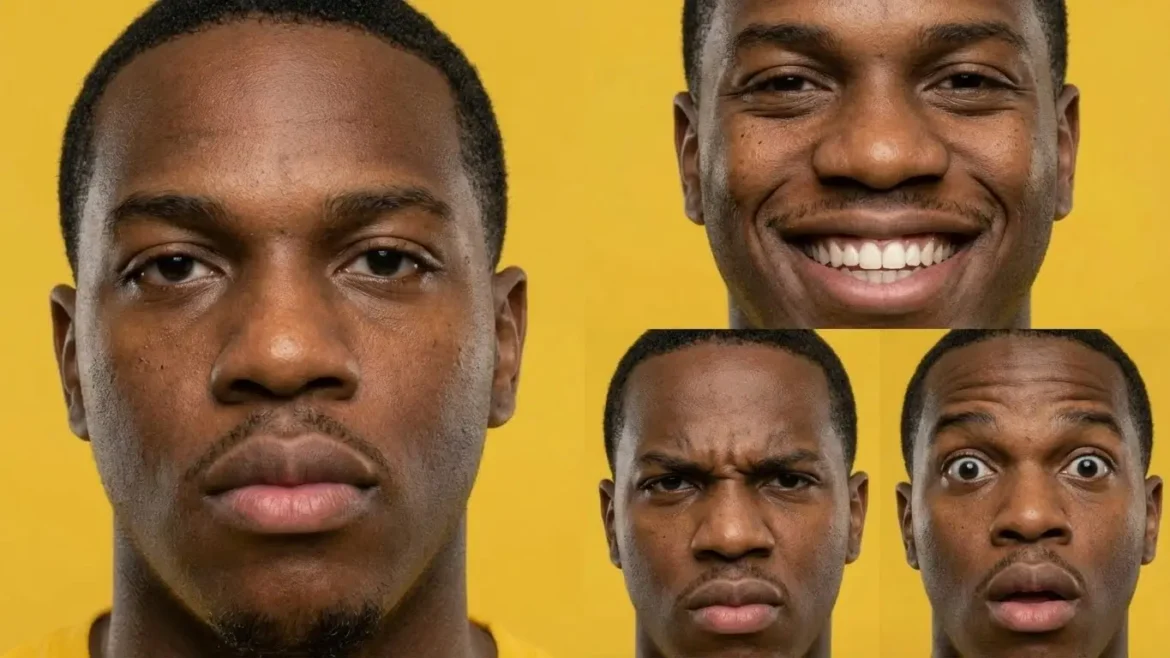
How Can I Use My Digital Clone for an Album Cover?
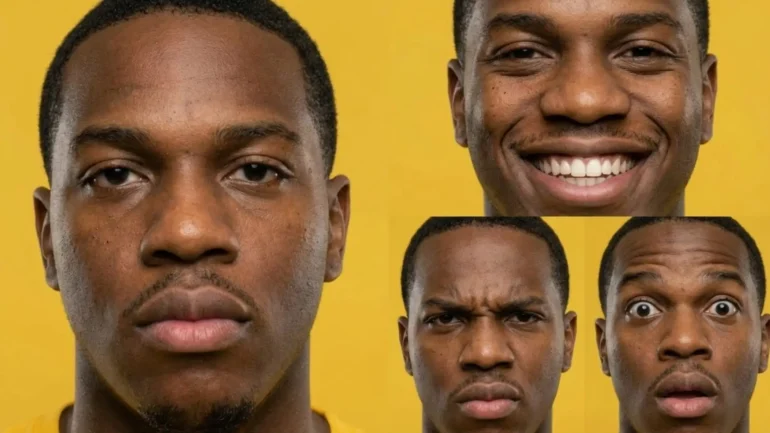
Text prompt: > Character expression sheet for a young Black man with visible subtle skin pores, short, tightly coiled very dark brown hair closely cropped to his head, dark brown eyes with darker limbal rings and brown eyelids under dark eyebrows, a defined brow bone, and a broad nose with a rounded tip. He has full lips, a short stubble beard along his chin, and a neutral expression, split screen composition divided into four distinct panels. Extreme close-up portraits focusing on the face. Top Left: A neutral, calm expression with soft eyes. Top Right: A wide, joyful smile clearly showing teeth. Bottom Left: An angry, furious expression with furrowed brows. Bottom Right: A surprised, shocked expression with wide eyes. Maintain consistent facial features and lighting across all panels. High fidelity, detailed skin texture. On a flat yellow background. –ar 4:3
Do not use random selfies. You must use the “Digital Clone” sheet you created in our previous lesson. Upload this 6-in-1 photo to Gemini. It shows your face, body, and side view all at once. Then, use the “Identity Lock” command to keep your face looking real.
Find your “6-Shot Character Sheet” on your device.
It shows your face, body, side, and back view.
Tap the Plus (+) button in Gemini (or drag them all in bulk over the chat field and release).
The computer reads all six angles at once.
This works much better than loose photos.
Tap Add to put it in the chat.
2. The “Identity Lock” Secret Code
Now, tell the computer to look at your Clone Sheet.
Start your message with this rule.
Type: “INSTRUCTION: IDENTITY LOCK.”
Add: “Use the 6-shot reference sheet.”
Add: “Keep the face and body exactly like the photos.”
Add: “Do not change the person’s identity.”
This acts like a digital glue for your face.
Prompt: > “INSTRUCTION: IDENTITY LOCK. Use the uploaded 6-shot reference sheet. Keep the face and body exactly like the photos. Do not change the person’s identity. Note: Prioritize pixel accuracy for the subject.”
3. Stopping Bad Faces (Negative Prompts)
Sometimes the AI tries to change your look. You must say “No.”
Prompt: > “INSTRUCTION: IDENTITY LOCK. Use the uploaded 6-shot reference sheet. Keep the face and body exactly like the photos. Do not change the person’s identity. Note: Prioritize pixel accuracy for the subject. Negative Prompt: Distorted face, plastic skin, cartoon look.”
Pro Tip: Did you skip the first lesson? Stop! Go read Make a Digital Clone of Yourself with AI first. You need that specific 6-shot photo to make this work perfectly.
Crafting the Aesthetic (Genre-Specific Strategies)
What Are the Best Prompts for My Music Genre?
To make great art, you need a “recipe” called a Prompt. Do not just say “make it cool.” You must combine your photo with special style words like “Cyberpunk” or “Cartoon.” This helps the computer match the picture to your music’s specific sound and feeling.
1. The “Golden Prompt” Recipe
Do not guess what to write. Use this four-step list to make the computer understand you perfectly.
The Role: Tell it “Act as a professional artist.”
The Context: Say “Use the 6-shot character sheet I uploaded.”
The Subject: Describe what you are doing, like “Sitting on a throne.”
The Rules: List the lighting and colors, like “Dark shadows and red lights.”
Prompt: > “Act as a professional [Type of Artist]. INSTRUCTION: IDENTITY LOCK. Use the uploaded 6-shot reference sheet. Create an image of the person [Doing Action]. The setting is [Place]. The lighting is [Type of Light]. The art style is [Art Style].”
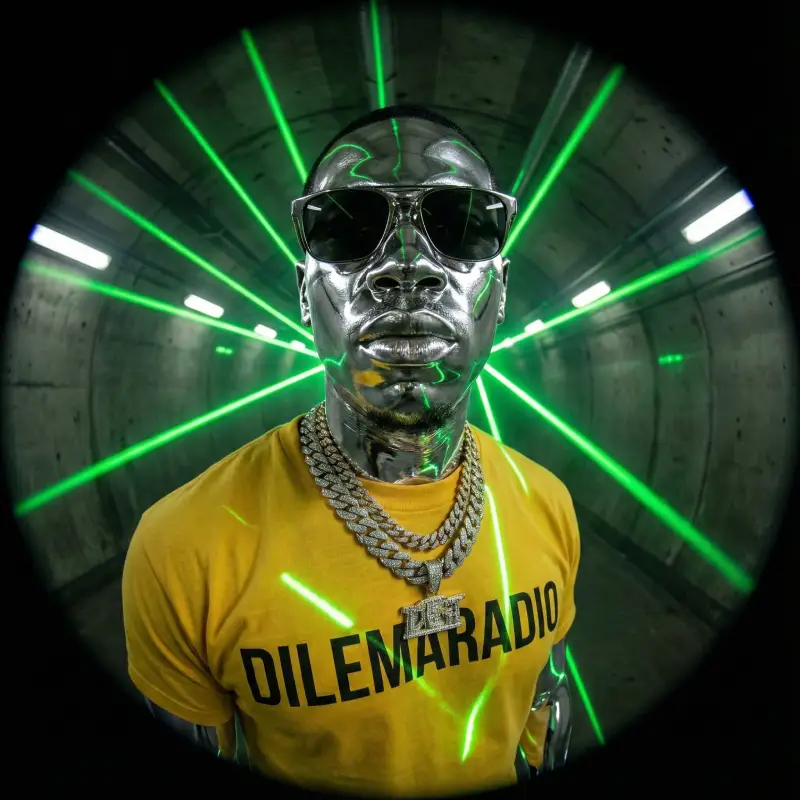
2. Rap & Hip-Hop (The “Rap Star” Look)
Rap music needs to look tough and shiny. We use a style called “Dark Trap” or “Future Y2K.”
Copy this Recipe:
Start: “Create a Rap Album Cover.”
Subject: “Use the 6-shot reference. Make the person look confident.”
Style: “Dark Trap and Y2K Futurism.”
Visuals: “Give the skin a chrome texture. Use a fisheye lens effect.”
Background: “A dark tunnel with green laser beams.”
Vibe: “Gritty, rich, and powerful.”
Aspect ratio: “1:1”
Prompt: > “Create a Rap Album Cover. INSTRUCTION: IDENTITY LOCK. Use the 6-shot reference sheet. Subject: The person is wearing a heavy chain and sunglasses. Give their skin a shiny chrome texture. Camera: Use a 14mm fisheye lens for a cool, distorted look. Background: A dark subway tunnel with bright green laser beams. Vibe: Tough, wealthy, and futuristic. Aspect ratio: 1:1”
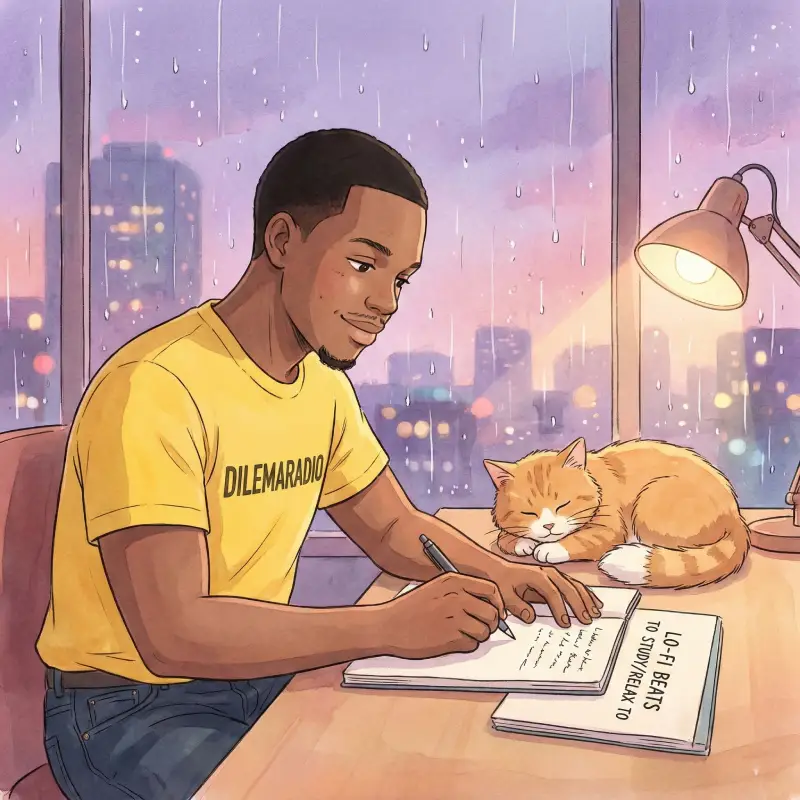
3. Lo-Fi & Indie (The “Cozy Anime” Look)
Lo-Fi music is relaxing. The art should look like a hand-drawn cartoon or a painting.
Copy this Recipe:
Start: “Create a Lo-Fi Album Cover.”
Subject: “Turn the reference photo into a hand-drawn anime character.”
Style: “Studio Ghibli inspired art style.”
Action: “Studying at a desk with headphones on.”
Colors: “Soft pastel purple and orange colors.”
Background: “A rainy city window at night.”
Prompt: > “Create a Lo-Fi Album Cover. INSTRUCTION: IDENTITY LOCK. Turn the person in the 6-shot sheet into a hand-drawn anime character. Action: The character is writing in a notebook next to a sleeping cat. Style: Studio Ghibli watercolor style. Colors: Soft pastel purple, pink, and orange. Background: A rainy window looking out at a city at night. Aspect ratio: 1:1”
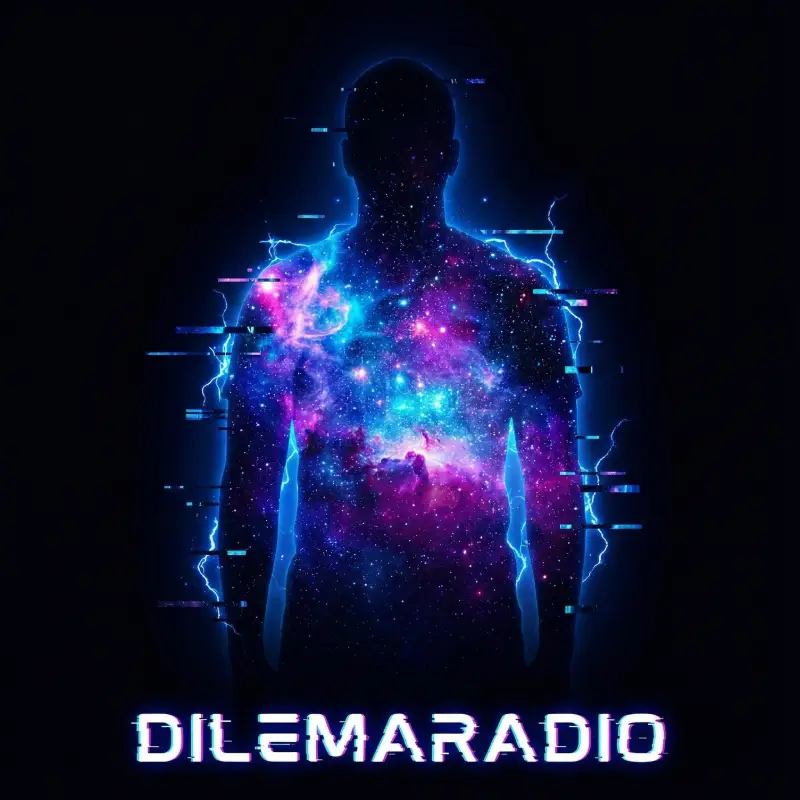
4. Electronic & Pop (The “Neon Future” Look)
Pop music is bright and loud. We use “Abstract” art with lots of glowing shapes.
Copy this Recipe:
Start: “Create an Electronic Album Cover.”
Subject: “A dark silhouette of the person from the photo.”
Fill: “Fill the body shape with neon star clusters.”
Background: “A deep black space void.”
Details: “Glowing geometric lines and glitch effects.”
Text: “Add the words ‘NEON WAVES’ in the center.”
Prompt: > “Create an Electronic Album Cover. INSTRUCTION: IDENTITY LOCK. Use the 6-shot reference sheet. Subject: Create a dark silhouette of the person. Fill: Fill the inside of the body shape with glowing neon star clusters and galaxies. Background: A deep black void. Details: Add floating digital glitch lines and blue electric sparks around the body. Aspect ratio: 1:1”
Pro Tip: Tell the computer the exact colors you want. If you just say “blue,” it might pick a sad blue. If you say “Bright Neon Electric Blue,” it knows you want a party color!
Typography & Text Integration
How Do I Add Text to AI-Generated Images?
You can put your band name right on the cover! Just put your words inside “quotation marks.” The computer draws them to look like real paint, neon lights, or gold. It does not just paste them on top. It looks very professional.
How to Write Perfect Words
Most AI tools cannot spell. Nano Banana Pro is different! It can write your name correctly. Follow these simple steps.
Pick Your Name: Decide on your album title first.
Choose a Style: Do you want Graffiti, Neon, or Metal letters?
Start Typing: Add this to your prompt.
The Magic Quotes: Type: “Display the text ‘YOUR NAME’.”
Be Exact: You must use single quotes ' ' around the words.
Describe the Font: Say: “Use a bold, dripping red graffiti font.”
Place It: Say: “Write it on the wall behind the person.”
The Rap Sticker: For Hip-Hop, you need the warning label.
Add the Label: Type: “Add a clear Parental Advisory label in the bottom corner.”
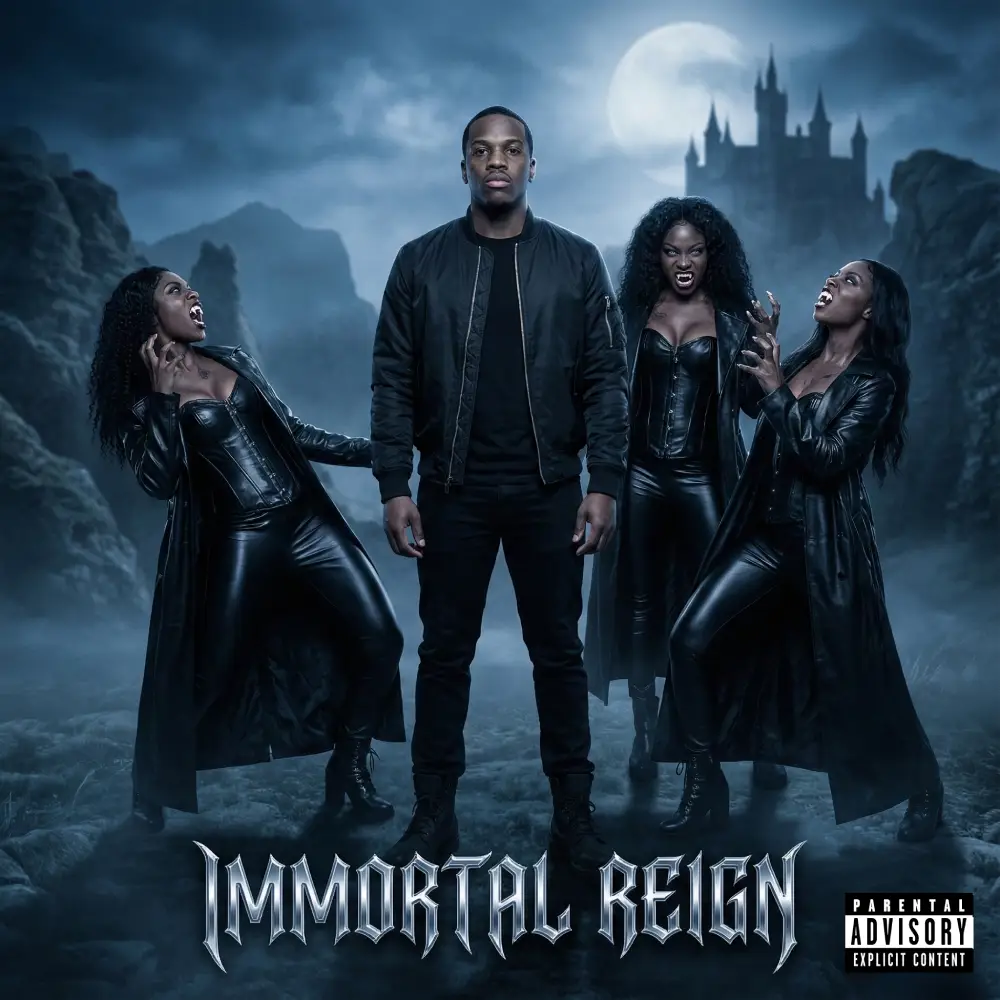
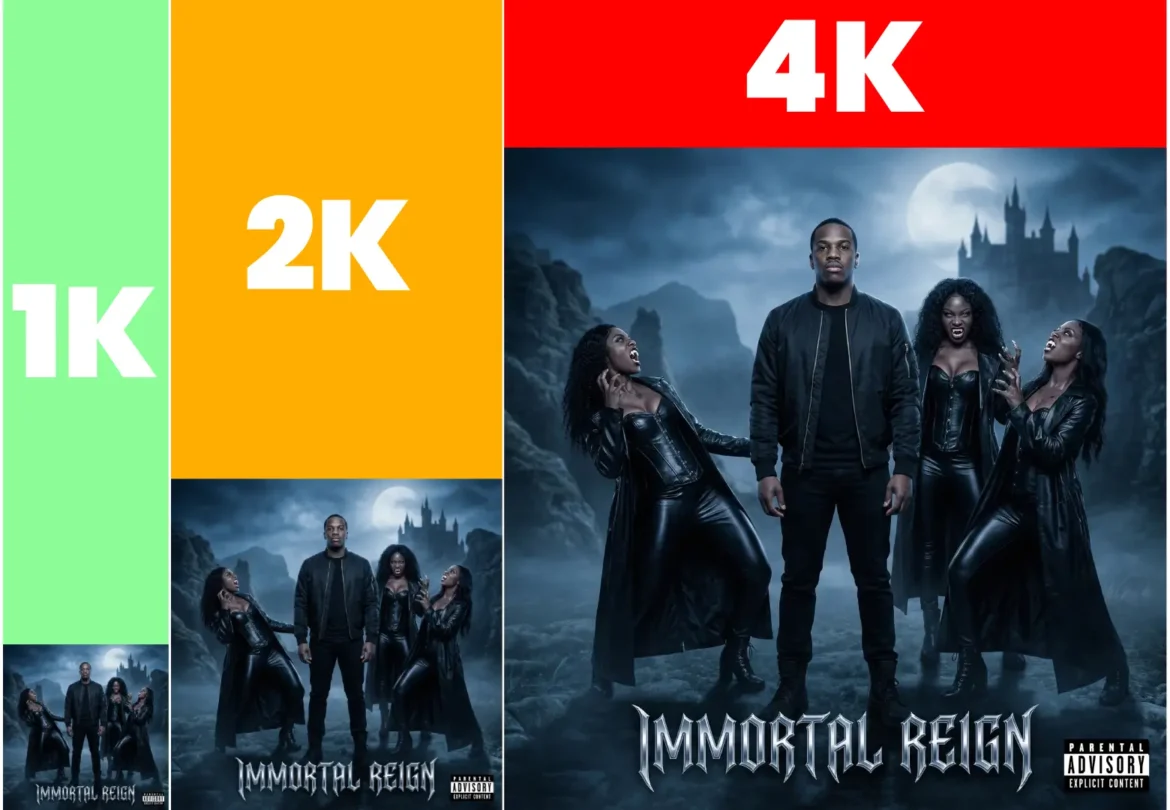
Prompt: > “reate a Cinematic Album Cover. INSTRUCTION: IDENTITY LOCK. Use the uploaded 6-shot reference sheet for the central ‘Master Vampire’ figure. Subject: The Master Vampire stands calm and commanding in the center foreground, wearing a black ma1 bomber jacket, black shirt, black jeans and black army boots. Supporting Characters: Surrounding him are three beautiful Black Afro-American female vampires in black shiny leather outfits with floor-length coats. Action: The female vampires are hissing, showing fangs, and twisting in weird, supernatural poses. Background: A misty night landscape with Dracula’s castle on the far horizon. Style: Professional photography with blue desaturated color grading. Text: Display the album name ‘IMMORTAL REIGN’ in a sharp, chrome gothic font at the bottom. Label: Add a realistic Parental Advisory label in the corner. Aspect ratio: 1:1”
Pro Tip: Keep your title short! The computer spells one or two words perfectly. If you try to write a whole long sentence, it might get confused and make spelling mistakes.
Refinement & Export
How Do I Save My Album Cover?
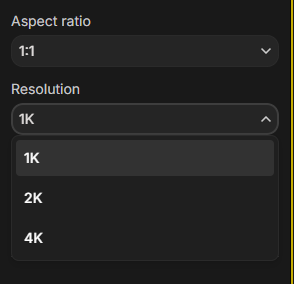
Your art is almost ready! The app saves pictures in 2K resolution. This is perfect for Spotify and phones. Do you need a huge 4K picture for a poster? You must use a special tool called Google AI Studio. It costs a few cents.
1. The Waiting Game
Good art takes time. The “PRO” model is not fast like a filter.
Tap Generate and put your phone down.
It takes 3 to 10 minutes to finish.
Do not close the app while it loads.
The computer is calculating light and shadows.
It is worth the wait for a good result.
2. Saving for Spotify (Standard 2K)
For most music apps, the standard download is perfect.
Tap the Download icon (the arrow).
This saves a 2K high-quality image.
Use this for Spotify, Apple Music, and Instagram.
It looks very sharp on all screens.
3. The “Super Size” Method (True 4K)
Do you want to print a big vinyl cover? You need 4K size. The app cannot do this yet. You must use Google AI Studio.
Login and click “Playground” in the main navigation.
Pick the model: gemini-3-pro-image-preview.
Set the size to 4096 (this is 4K).
Upload your cover.
Type your Golden Prompt again “Upscale this to 4K resolution“.
Warning: This is not free!
It costs about 25 cents per image.
Pro Tip: Only use the paid 4K tool for your final choice. Use the free App to test your ideas first. This saves you money! Do you need art for Spotify and TikTok? You do not need to make two covers. Just type: “Expand this image to a 9:16 vertical ratio.” It will draw more background at the top and bottom automatically!
Beyond the Static Image
Your Brand is Ready! You created professional art. You skipped the big studio costs. Your music now has a face. This helps fans remember you.
Make it Move (Spotify Canvas) Static pictures are great, but moving videos are exciting. You can bring your cover to life!
Ask Gemini to use the Veo tool.
Type: “Turn this image into a video.”
Add: “Make the lights flicker and smoke move.”
Upload this cool loop to Spotify Canvas.
Start Creating Today You have the tools. You have the “Golden Prompt.” Now you must play. Use your Clone Sheet with different styles. Go make your masterpiece!
Frequently Asked Questions (FAQ)
Is Nano Banana Pro free to use?
The basic “Fast” model is free for everyone. But to use the professional “Thinking/PRO” model that makes perfect text and lighting, you usually need a Gemini Advanced subscription.
Can I sell my music with this album cover?
Yes! You can use these pictures for your songs on Spotify, Apple Music, and YouTube. You own the rights to the art you make.
Why does the “Thinking” model take so long?
It takes time because it is planning. Just like a human artist sketches before painting, this model calculates the shadows, spelling, and physics first. The wait makes the picture look much better.
How do I print my cover on a big vinyl record?
The app saves images in 2K resolution, which is great for phones. For a big printed record, you should use the “Upscale to 4K” command or use Google AI Studio to get a huge file.
Will people know I used AI?
Maybe. But Google adds a secret invisible mark called SynthID to the file. You cannot see it, but it tells computers that the image is made by AI. This keeps everything honest and safe.
Can I use a picture of a famous person?
No. The computer will refuse to make fake pictures of real famous people. It is best to use your own photos or create new characters.
In our last tutorial, you did something very smart. You made a Digital Clone of yourself. You took special photos of your face and body so the computer knows exactly what you look like. Today, we are going to use that clone to take professional photos for your music career. These photos are like your primary money or "cultural capital". It's time to present yourself as a professional. We will […]